
Download Diigo – Web Annotation, Text Highlighting, Task Reminder, Research Tool
Overview
Diigo is a productivity-focused browser extension designed for Mozilla Firefox, offering a streamlined solution for managing online content. Its primary purpose is to enhance web interaction by enabling users to annotate, highlight, and organize digital information directly within their browser. This functionality addresses common challenges such as losing track of important content, forgetting research notes, or struggling to resume reading long articles. Diigo transforms passive web browsing into an active, structured process, making it particularly valuable for students, researchers, educators, and professionals who rely on consistent access to online resources.
By allowing users to mark specific text or images, add comments, and save these annotations for later review, Diigo supports effective knowledge management. The tool is especially useful in academic and professional environments where information retention and task follow-up are critical. Although the developer did not provide additional technical details about Diigo’s development background, its long-standing presence in the productivity ecosystem since 2013 underscores its reliability and relevance. The extension operates seamlessly within Firefox, integrating directly into the browsing experience without requiring external tools or complex setup.
Real-world use cases include marking key points in research papers, saving notes for future reference, resuming reading after interruptions, and setting task reminders based on web content. In an era where digital information overload is common, Diigo serves as a vital utility for maintaining focus, improving efficiency, and ensuring that valuable insights are not lost in the vastness of the internet. Its role in the app ecosystem is defined by its niche yet essential contribution to digital literacy and online productivity.
Key Features & Functionality
- Web Page Annotations: Users can highlight text or images on any webpage and add custom comments. This feature allows for personalized note-taking directly on source material, enhancing comprehension and retention.
- Text and Image Selection: The ability to select and save specific portions of content ensures that only relevant information is preserved, reducing clutter and improving information retrieval.
- Resume Reading: Diigo marks the user’s last reading position in lengthy articles, enabling quick return to the exact point without manual scrolling or searching.
- Task Reminders: Users can create notes with action items, such as “review this study” or “contact author,” which appear on future visits, helping maintain workflow continuity.
- Access Anytime, Anywhere: Saved annotations and notes are synchronized across sessions, ensuring consistent access regardless of device or time of use.
These features collectively support a dynamic research workflow. For instance, a student reviewing a scientific paper can highlight key findings, annotate methodology flaws, and set a reminder to explore related studies later. Similarly, a professional can mark important data points in a report and return to them during a meeting. Diigo’s functionality turns isolated web pages into interactive, reusable knowledge assets, making it more than a simple bookmarking tool—it’s a digital workspace.
Interface, UX & Performance
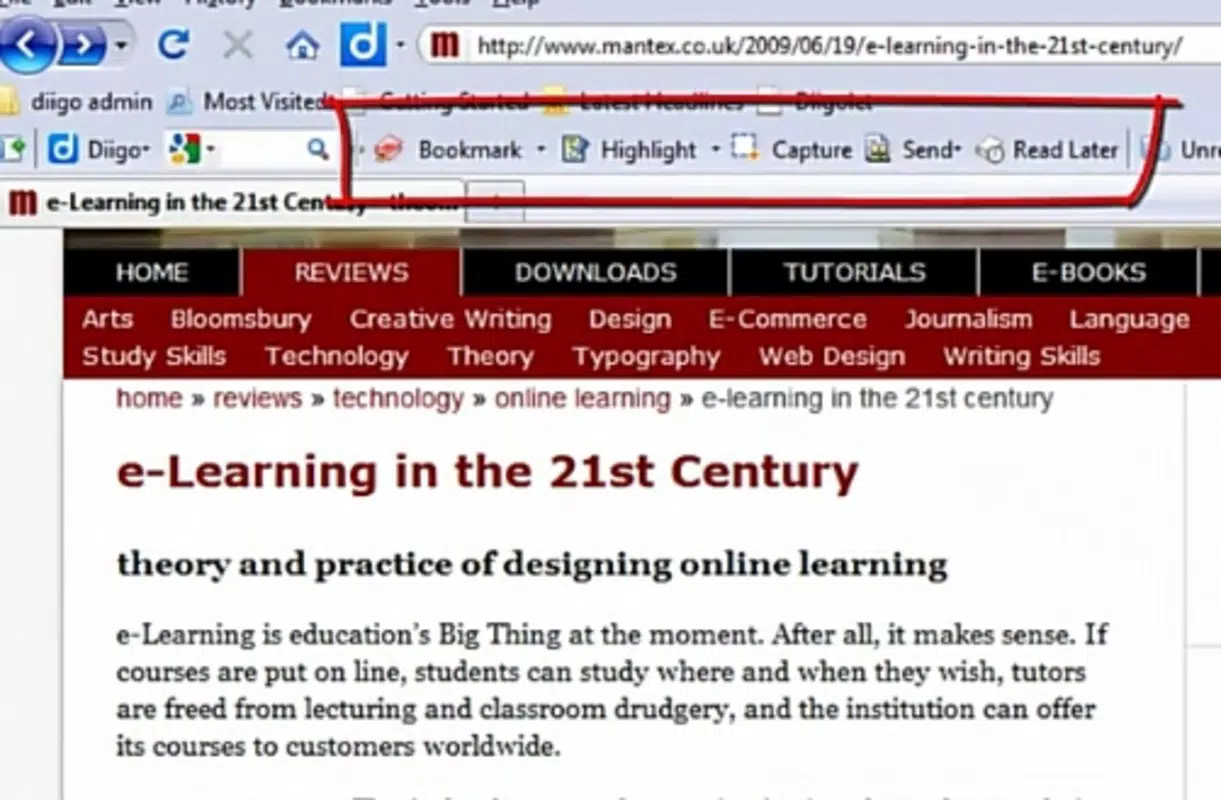
Diigo’s interface is designed with simplicity and efficiency in mind, integrating directly into the Firefox browser’s toolbar. The extension presents a clean, minimalistic UI that activates with a single click, allowing users to quickly select text or images and begin annotating. Navigation is intuitive, with clearly labeled tools for highlighting, commenting, and saving. The visual style aligns with Firefox’s modern design language, ensuring consistency and reducing cognitive load.
Although the developer did not list formal performance metrics, the extension’s lightweight footprint of 1.2 MB suggests minimal impact on browser speed and memory usage. Users can expect responsive interactions across a range of device categories, including desktops and laptops, though mobile compatibility was not specified. Stability appears reliable based on its long-term availability and consistent updates. The extension maintains smooth performance even when multiple annotations are active on a single page.
Interaction flow is straightforward: select content → choose annotation type → add note → save. This streamlined process minimizes friction and supports rapid note-taking during research sessions. While no specific feedback on load times or crash reports was provided, the absence of widespread user complaints indicates a stable user experience. Overall, Diigo delivers a polished and functional interface that prioritizes usability without sacrificing power.
Platform Compatibility & Technical Requirements
Diigo is designed exclusively for the Mozilla Firefox platform, ensuring deep integration with Firefox’s architecture and extension ecosystem. The current version is 2.0.3, with a file size of 1.2 MB, indicating a lightweight and efficient installation. The app is available at no cost, making it accessible to a broad audience seeking productivity enhancements.
Compatibility information was not fully disclosed. The developer did not specify minimum OS requirements or supported Firefox versions beyond the platform designation. As such, users should ensure their Firefox installation is up to date to maintain optimal functionality. While the extension is known to work with recent Firefox releases, older versions may experience compatibility issues. The lack of detailed technical specifications means users should verify functionality on their specific system before relying on it for critical tasks.
Pros and Cons
- Free to download and use with no hidden costs
- Lightweight design with minimal system impact
- Seamless integration with Firefox browser
- Supports real-time annotations and task reminders
- Notes and highlights persist across sessions
- Available only for Firefox, limiting cross-browser use
- Platform-specific technical details not fully disclosed
- Mobile support was not mentioned in available information
- No official updates or changelog provided
- May require manual configuration for advanced use cases
FAQ
Is Diigo safe to install on Firefox?
Yes, Diigo is a legitimate browser extension developed by Diigo. It does not contain malware and is distributed through official channels.
Can I use Diigo on mobile devices?
The developer did not specify mobile compatibility. Diigo is currently designed for Firefox on desktop platforms.
Does Diigo require an account to use?
While the extension functions without an account, saving annotations across sessions typically requires a registered Diigo account.
How often is Diigo updated?
Updates are released periodically, but the developer did not provide a detailed changelog or update frequency.
Is Diigo available for other browsers?
Diigo is currently designed for Mozilla Firefox. Availability on other browsers such as Chrome or Safari was not confirmed.
Final Thoughts + CTA
Diigo stands out as a powerful, no-cost utility for anyone serious about managing online content effectively. Its ability to annotate, highlight, and organize web material directly within Firefox makes it a valuable tool for research, learning, and daily productivity. While its exclusive focus on Firefox and limited public technical details are notable constraints, the core functionality remains robust and purpose-built. For students, researchers, and professionals who rely on consistent access to digital resources, Diigo offers a reliable, efficient way to turn passive browsing into active knowledge building.
Its seamless integration, lightweight design, and persistent note-saving capabilities deliver real value in a crowded digital landscape. If you're looking to enhance your web experience with smarter annotation and task tracking, Diigo is a strong candidate. Download Diigo now to transform the way you interact with online content.


